field-notes.dev
A field guide to writing less code
Why the best teams ship smaller systems — and how deletion became a design skill.
Save · Swipe · Find
Linkty turns the pile of links you save into cards. Swipe right to keep, left to skip — like Tinder for your bookmarks — and get a reading library you can actually search.
Free · No account · Links stay on your device
Why the best teams ship smaller systems — and how deletion became a design skill.
We ranked every to-do app so you don’t have to. Number 23 will surprise you.
The neuroscience of movement and memory, and what a 20-minute walk does to ideas.
1/23 — Everyone gets this wrong. Here’s the framework nobody talks about…
A 40-minute talk on attention, restraint, and why good software stays quiet.
It’s 2× faster, 3× smaller, and will be deprecated by the time you finish this post.
Links pile up in messengers, tabs and notes — most are never read. Not because they're bad, but because there's no system. Sorting them is boring, so nobody does.
How it works
Share a link into Linkty from any app — the share sheet is the whole workflow. It lands in one queue instead of ten places.
Each link becomes a card. Right to keep, left to skip — one or two seconds per link, momentum does the rest.
Kept links live in a searchable library. Tags and search bring back exactly the link you remember.
Swipe
Every saved link shows up as a card with a live preview — title, image, source. Swipe right to keep, left to dismiss, and clear a week's backlog in minutes.
Linkty fetches the page's title and artwork, so you judge the content — not a bare URL.
Keep and Skip live under the card for one-handed taps. Swiping is just faster.
Tags
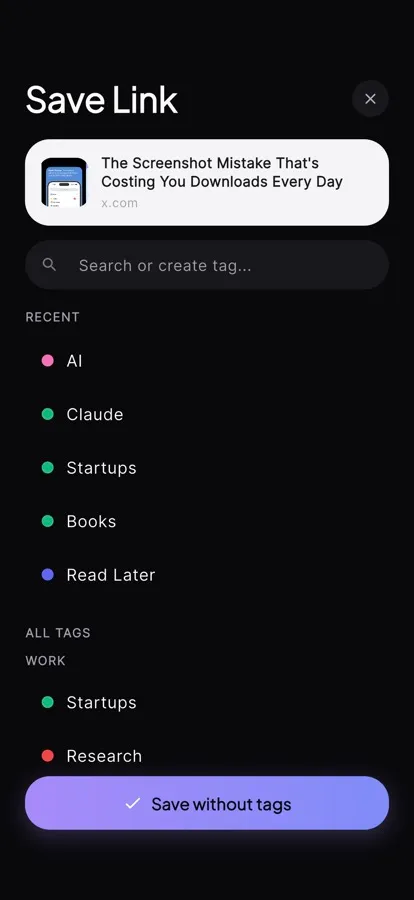
The moment you keep a link is the moment you still remember why. Add tags right on the card and retrieval becomes instant later.
Create tags on the fly — projects, topics, moods. No folders to maintain.
A tagged link still means something in six months. An untagged bookmark doesn't.
Library
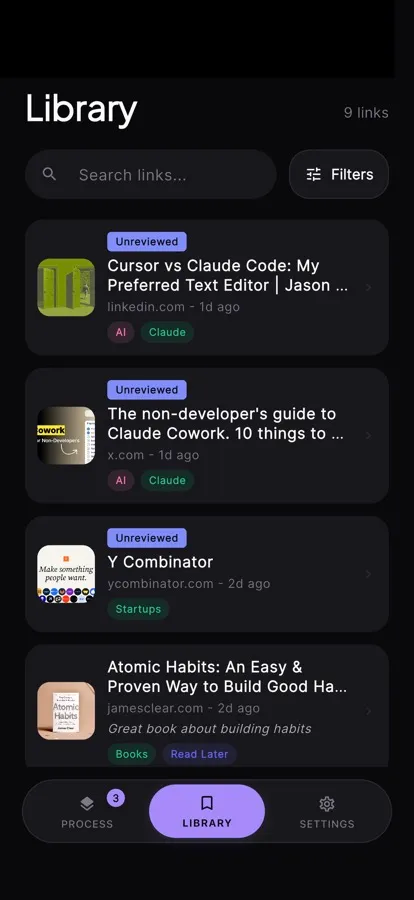
Everything you kept lives in one clean place. Filter by tag, search by title, and get back to what actually matters.
Half-remembered titles are enough — search covers titles and tags together.
Links are stored on your device. No account, no feed, no one reading over your shoulder.
The method
Sorting and reading are different jobs. Linkty splits them, so neither blocks the other.
Layer 1 · Triage
Keep or skip — that's the whole decision. No reading, no guilt, no “I'll deal with it later.” The backlog empties fast because the bar is low.
Layer 2 · Evaluate
When there's actually time: open the link, read it, tag it, add a note. The library waits — nothing expires, nothing nags.
Linkty keeps your saved links swipeable, searchable and easy to revisit when you actually need them.
Download on the App StoreFree on iOS · No account required